!pip install lxml
!pip install bs4If you want to try the examples in this tutorial:



TipSkills you will acquire in this chapter
- Understand the key challenges of web scraping, including legal concerns (e.g. GDPR, grey areas), site stability, and data reliability
- Follow best practices when scraping: check the
robots.txtfile, space out your requests, avoid overloading servers, and scrape during off-peak hours when possible
- Navigate the HTML structure of a web page (tags, parent-child relationships) to accurately target the elements you want to extract
- Use the
requestslibrary to fetch web page content, andBeautifulSoupto parse and explore the HTML using methods likefindandfind_all
- Practice your scraping skills with a hands-on exercise involving the French Ligue 1 football team list
- Explore Selenium for simulating user interactions on JavaScript-driven dynamic pages
- Understand the limitations of web scraping and know when it’s better to use more stable and reliable APIs
Web scraping refers to techniques for extracting content from websites. It is a very useful practice for anyone looking to work with information available online, but not necessarily in the form of an Excel table.
This chapter introduces you to how to create and run bots to quickly retrieve useful information for your current or future projects. It starts with some concrete use cases. This chapter is heavily inspired and adapted from Xavier Dupré’s work, the former professor of the subject.
1 Issues
A number of issues related to web scraping will only be briefly mentioned in this chapter.
1.1 The Legal Gray Area of Web Scraping
First, regarding the legality of retrieving information through scraping, there is a gray area. Just because information is available on the internet, either directly or with a little searching, does not mean it can be retrieved and reused.
The excellent course by Antoine Palazzolo discusses several media and legal cases on this issue. In France, the CNIL published new guidelines in 2020 on web scraping, clarifying that any data cannot be reused without the knowledge of the person to whom the data belongs. In other words, in principle, data collected by web scraping is subject to GDPR, meaning it requires the consent of the individuals from whom the data is reused.
It is therefore recommended to be cautious with the data retrieved by web scraping to avoid legal issues.
1.2 Stability and Reliability of Retrieved Information
Data retrieval through web scraping is certainly practical, but it does not necessarily align with the intended or desired use by a data provider. Since data is costly to collect and make available, some sites may not necessarily want it to be extracted freely and easily. Especially when the data could provide a competitor with commercially useful information (e.g., the price of a competing product).
As a result, companies often implement strategies to block or limit the amount of data scraped. The most common method is detecting and blocking requests made by bots rather than humans. For specialized entities, this detection is quite easy because numerous indicators can identify whether a website visit comes from a human user behind a browser or a bot. To mention just a few clues: browsing speed between pages, speed of data extraction, fingerprinting of the browser used, ability to answer random questions (captcha)…
The best practices mentioned later aim to ensure that a bot behaves civilly by adopting behavior close to that of a human without pretending to be one.
It’s also essential to be cautious about the information received through web scraping. Since data is central to some business models, some companies don’t hesitate to send false data to bots rather than blocking them. It’s fair play! Another trap technique is called the honey pot. These are pages that a human would never visit—for example, because they don’t appear in the graphical interface—but where a bot, automatically searching for content, might get stuck.
Without resorting to the strategy of blocking web scraping, other reasons can explain why a data retrieval that worked in the past may no longer work. The most frequent reason is a change in the structure of a website. Web scraping has the disadvantage of retrieving information from a very hierarchical structure. A change in this structure can make a bot incapable of retrieving content. Moreover, to remain attractive, websites frequently change, which can easily render a bot inoperative.
In general, one of the key takeaways from this chapter is that web scraping is a last resort solution for occasional data retrieval without any guarantee of future functionality. It is preferable to favor APIs when they are available. The latter resemble a contract (formal or not) between a data provider and a user, where needs (the data) and access conditions (number of requests, volume, authentication…) are defined, whereas web scraping is more akin to behavior in the Wild West.
1.3 Best Practices
The ability to retrieve data through a bot does not mean one can afford to be uncivilized. Indeed, when uncontrolled, web scraping can resemble a classic cyberattack aimed at taking down a website: a denial of service. The course by Antoine Palazzolo reviews some best practices that have emerged in the scraping community. It is recommended to read this resource to learn more about this topic. Several conventions are discussed, including:
- Navigate from the site’s root to the
robots.txtfile to check the guidelines provided by the website’s developers to regulate the behavior of bots; - Space out each request by several seconds, as a human would, to avoid overloading the website and causing it to crash due to a denial of service;
- Make requests during the website’s off-peak hours if it is not an internationally accessed site. For example, for a French-language site, running the bot during the night in metropolitan France is a good practice. To run a bot from
Pythonat a pre-scheduled time, there arecronjobs.
2 A Detour to the Web: How Does a Website Work?
Even though this lab doesn’t aim to provide a web course, you still need some basics on how a website works to understand how information is structured on a page.
A website is a collection of pages coded in HTML that describe both the content and the layout of a Web page.
To see this, open any web page and right-click on it.
- On
Chrome: Then click on “View page source” (CTRL+U); - On
Firefox: “View Page Source” (CTRL+SHIFT+K); - On
Edge: “View page source” (CTRL+U); - On
Safari: see how to do it here.
If you know which element interests you, you can also open the browser’s inspector (right-click on the element + “Inspect”) to display the tags surrounding your element more ergonomically, like a zoom.
3 Scraping with Python: The BeautifulSoup Package
3.1 Available Packages
In the first part of this chapter,
we will primarily use the BeautifulSoup4 package,
in conjunction with requests. The latter package allow you to retrieve the raw text
of a page, which will then be inspected via BeautifulSoup4.
BeautifulSoup will suffice when you want to work on static HTML pages. As soon as the information you are looking for is generated via the execution of JavaScript scripts, you will need to use tools like Selenium.
Similarly, if you don’t know the URL, you’ll need to use a framework like Scrapy, which easily navigates from one page to another. This technique is called “web crawling”. Scrapy is more complex to handle than BeautifulSoup: if you want more details, visit the Scrapy tutorial page.
Web scraping is an area where reproducibility is difficult to implement. A web page may evolve regularly, and from one web page to another, the structure can be very different, making some code difficult to export. Therefore, the best way to have a functional program is to understand the structure of a web page and distinguish the elements that can be exported to other use cases from ad hoc requests.
NoteNote
To be able to use Selenium, it is necessary
to make Python communicate with a web browser (Firefox or Chromium).
The webdriver-manager package allows Python to know where
this browser is located if it is already installed in a standard path.
To install it, the code in the cell below can be used.
To run Selenium, you need to use a package
called webdriver-manager. So, we’ll install it, along with selenium:
!pip install selenium
!pip install webdriver-manager
3.2 Retrieve the Content of an HTML Page
Let’s start slowly. Let’s take a Wikipedia page, for example, the one for the 2019-2020 Ligue 1 football season: 2019-2020 Championnat de France de football. We will want to retrieve the list of teams, as well as the URLs of the Wikipedia pages for these teams.
Step 1️⃣: Connect to the Wikipedia page and obtain the source code.
For this, the simplest way is to use the requests package.
This allows Python to make the appropriate HTTP request to obtain the content of a page from its URL:
import requests
url_ligue_1 = "https://fr.wikipedia.org/wiki/Championnat_de_France_de_football_2019-2020"

request_text = requests.get(
    url_ligue_1,
    headers={"User-Agent": "Python for data science tutorial"}
).contentrequest_text[:150]b'<!DOCTYPE html>\n<html class="client-nojs vector-feature-language-in-header-enabled vector-feature-language-in-main-menu-disabled vector-feature-langua'
WarningWarning
To limit the volume of bot retrieving information from Wikipedia (much used by LLMs, for example), you should now specify a user agent via request. This is a good practice, enabling sites to know who is using their resources.
Step 2️⃣: search this abundant source code for the tags that will extract the information we’re interested in. The main interest of the BeautifulSoup package is to offer easy-to-use methods for searching complex texts for strings of characters from HTML or XML tags.
import bs4
page = bs4.BeautifulSoup(request_text, "lxml")
If we print the page object created with BeautifulSoup,
we see that it is no longer a string but an actual HTML page with tags.
We can now search for elements within these tags.
3.3 The find method
As a first illustration of the power of BeautifulSoup, we want to know the title of the page. To do this, we use the .find method and ask it “title ”.
print(page.find("title"))<title>Championnat de France de football 2019-2020 — Wikipédia</title>The .find method only returns the first occurrence of the element.
To verify this, you can:
- copy the snippet of source code obtained when you search for a
table, - paste it into a cell in your notebook,
- and switch the cell to “Markdown”.
If we take the previous code and replace title with table, we get
print(page.find("table"))Voir le résultat
print(page.find("table"))which is the source text that generates the following table:
| Sport | Football |
|---|---|
| Organisateur(s) | LFP |
| Édition | 82e |
| Lieu(x) |
.svg) France et France et  Monaco Monaco
|
| Date |
Du au (arrêt définitif) |
| Participants | 20 équipes |
| Matchs joués | 279 (sur 380 prévus) |
| Site web officiel | Site officiel |
3.4 The find_all Method
To find all occurrences, use .find_all().
print("Il y a", len(page.find_all("table")), "éléments dans la page qui sont des <table>")Il y a 34 éléments dans la page qui sont des <table>
TipTip
Python is not the only language that allows you to retrieve elements from a web page. This is one of the main objectives of Javascript, which is accessible through any web browser.
For example, to draw a parallel with page.find('title') that we used in Python, you can open the previously mentioned page with your browser. After opening the browser’s developer tools (CTRL+SHIFT+K on Firefox), you can type document.querySelector("title") in the console to get the content of the HTML node you are looking for:
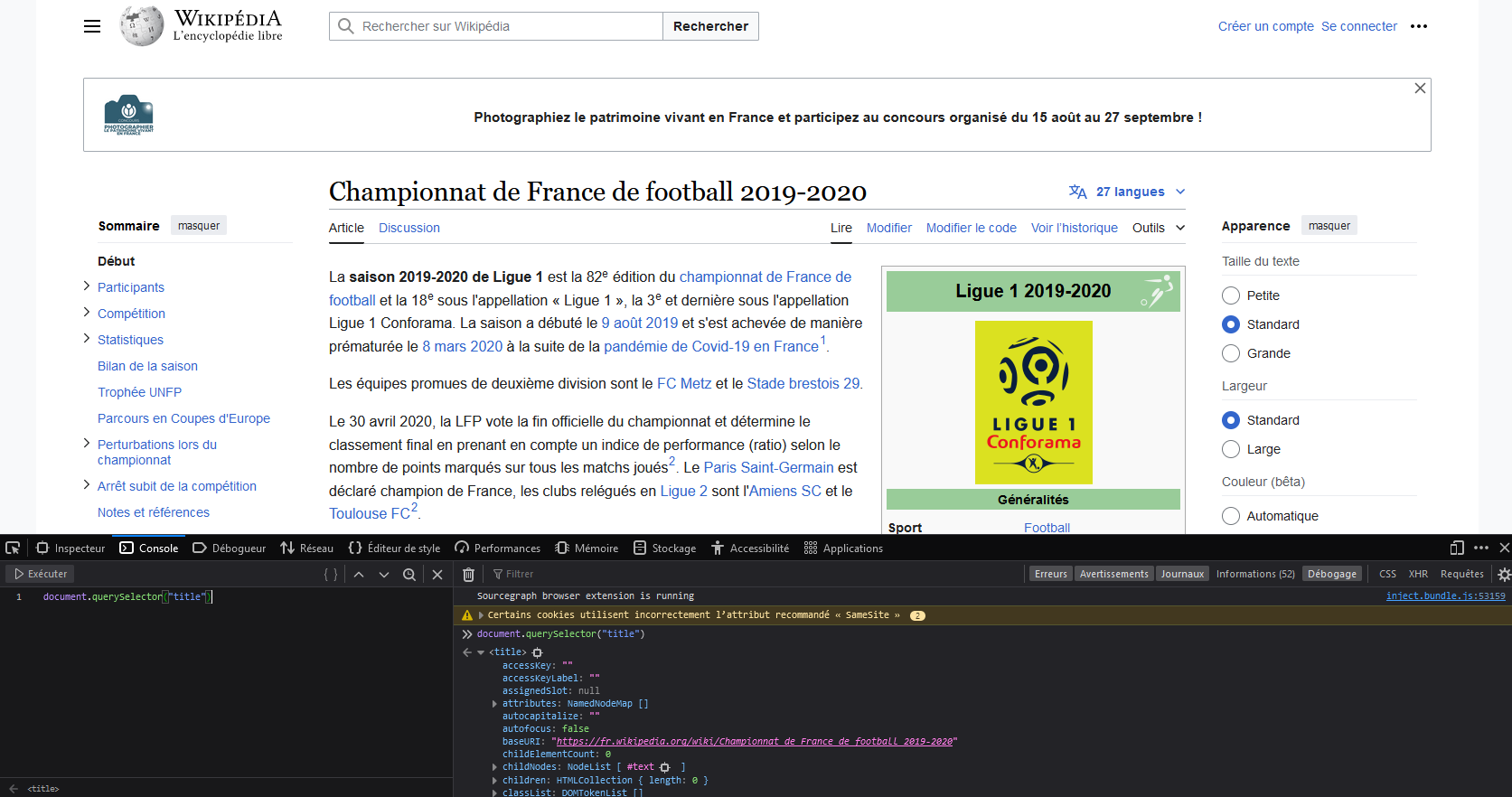
If you use Selenium for web scraping, you will actually encounter these Javascript verbs in any method you use.
Understanding the structure of a page and its interaction with the browser is extremely useful when doing scraping, even when the site is purely static, meaning it does not have elements reacting to user actions on the web browser.
4 Guided Exercise: Get the List of Ligue 1 Teams
In the first paragraph of the “Participants” page, there is a table with the results of the year.
TipExercise 1: Retrieve the Participants of Ligue 1
To do this, we will proceed in 6 steps:
- Find the table
- Retrieve each row from the table
- Clean up the outputs by keeping only the text in a row
- Generalize for all rows
- Retrieve the table headers
- Finalize the table
1️⃣ Find the table
# on identifie le tableau en question : c'est le premier qui a cette classe "wikitable sortable"
tableau_participants = page.find('table', {'class' : 'wikitable sortable'})print(tableau_participants)2️⃣ Retrieve each row from the table
Let’s first search for the rows where tr tag appears
table_body = tableau_participants.find('tbody')
rows = table_body.find_all('tr')
You get a list where each element is one of the rows in the table. To illustrate this, we will first display the first row. This corresponds to the column headers:
print(rows[0])The second row will correspond to the row of the first club listed in the table:
print(rows[1])3️⃣ Clean the outputs by keeping only the text in a row
We will use the text attribute to strip away all the HTML layer we obtained in step 2.
An example on the first club’s row:
- We start by taking all the cells in that row, using the
tdtag. - Then, we loop through each cell and keep only the text from the cell using the
textattribute. - Finally, we apply the
strip()method to ensure the text is properly formatted (no unnecessary spaces, etc.).
cols = rows[1].find_all('td')
print(cols[0])
print(cols[0].text.strip())
<td id="mwTA"><a href="https://fr.wikipedia.org/wiki/Paris_Saint-Germain_Football_Club" id="mwTQ" rel="mw:WikiLink" title="Paris Saint-Germain Football Club">Paris Saint-Germain</a></td>
Paris Saint-Germainfor ele in cols :
print(ele.text.strip())Paris Saint-Germain
1974
637
1er
Thomas Tuchel
2018
Parc des Princes
47 929
464️⃣ Generalize for all rows:
for row in rows:
    cols = row.find_all('td')
    cols = [ele.text.strip() for ele in cols]
We have successfully retrieved the information contained in the participants’ table. But the first row is strange: it’s an empty list…
These are the headers: they are recognized by the th tag, not td.
We will put all the content into a dictionary, to later convert it into a pandas DataFrame:
dico_participants = dict()
for row in rows:
    cols = row.find_all('td')
    cols = [ele.text.strip() for ele in cols]
    if len(cols) > 0 :
        dico_participants[cols[0]] = cols[1:]

dico_participantsimport pandas as pd
data_participants = pd.DataFrame.from_dict(dico_participants,orient='index')
data_participants.head()| 0 | 1 | 2 | 3 | 4 | 5 | 6 | 7 | |
|---|---|---|---|---|---|---|---|---|
| Paris Saint-Germain | 1974 | 637 | 1er | Thomas Tuchel | 2018 | Parc des Princes | 47 929 | 46 |
| LOSC Lille | 2000 | 120 | 2e | Christophe Galtier | 2017 | Stade Pierre-Mauroy | 49 712 | 59 |
| Olympique lyonnais | 1989 | 310 | 3e | Rudi Garcia | 2019 | Groupama Stadium | 57 206 | 60 |
| AS Saint-Étienne | 2004 | 100 | 4e | Claude Puel | 2019 | Stade Geoffroy-Guichard | 41 965 | 66 |
| Olympique de Marseille | 1996 | 110 | 5e | André Villas-Boas | 2019 | Orange Vélodrome | 66 226 | 69 |
5️⃣ Retrieve the table headers:
for row in rows:
    cols = row.find_all('th')
    print(cols)
    if len(cols) > 0 :
        cols = [ele.get_text(separator=' ').strip().title() for ele in cols]
columns_participants = colscolumns_participants['Club',
'Dernière Montée',
'Budget [ 3 ] En M €',
'Classement 2018-2019',
'Entraîneur',
'Depuis',
'Stade',
'Capacité En L1 [ 4 ]',
'Nombre De Saisons En L1']6️⃣ Finalize the table
data_participants.columns = columns_participants[1:]data_participants.head()| Dernière Montée | Budget [ 3 ] En M € | Classement 2018-2019 | Entraîneur | Depuis | Stade | Capacité En L1 [ 4 ] | Nombre De Saisons En L1 | |
|---|---|---|---|---|---|---|---|---|
| Paris Saint-Germain | 1974 | 637 | 1er | Thomas Tuchel | 2018 | Parc des Princes | 47 929 | 46 |
| LOSC Lille | 2000 | 120 | 2e | Christophe Galtier | 2017 | Stade Pierre-Mauroy | 49 712 | 59 |
| Olympique lyonnais | 1989 | 310 | 3e | Rudi Garcia | 2019 | Groupama Stadium | 57 206 | 60 |
| AS Saint-Étienne | 2004 | 100 | 4e | Claude Puel | 2019 | Stade Geoffroy-Guichard | 41 965 | 66 |
| Olympique de Marseille | 1996 | 110 | 5e | André Villas-Boas | 2019 | Orange Vélodrome | 66 226 | 69 |
5 Going Further
5.1 Retrieving stadium Locations
Try to understand step by step what is done in the following steps (retrieving additional information by navigating through the pages of the different clubs).
Code pour récupérer l’emplacement des stades
import requests
import bs4
import pandas as pd
from urllib.parse import urljoin


def retrieve_page(url: str) -> bs4.BeautifulSoup:
    """
    Retrieves and parses a webpage using BeautifulSoup.

    Args:
        url (str): The URL of the webpage to retrieve.

    Returns:
        bs4.BeautifulSoup: The parsed HTML content of the page.
    """
    r = requests.get(url, headers={"User-Agent": "Python for data science tutorial"})
    page = bs4.BeautifulSoup(r.content, 'html.parser')
    return page


def extract_team_name_url(team: bs4.element.Tag) -> dict:
    """
    Extracts the team name and its corresponding Wikipedia URL.

    Args:
        team (bs4.element.Tag): The BeautifulSoup tag containing the team information.

    Returns:
        dict: A dictionary with the team name as the key and the Wikipedia URL as the value, or None if not found.
    """
    try:
        team_url = team.find('a').get('href')
        equipe = team.find('a').get('title')
        url_get_info = urljoin("http://fr.wikipedia.org", team_url)
        print(f"Retrieving information for {equipe}")
        return {equipe: url_get_info}
    except AttributeError:
        print(f"No <a> tag for \"{team}\"")
        return None


def explore_team_page(wikipedia_team_url: str) -> bs4.BeautifulSoup:
    """
    Retrieves and parses a team's Wikipedia page.

    Args:
        wikipedia_team_url (str): The URL of the team's Wikipedia page.

    Returns:
        bs4.BeautifulSoup: The parsed HTML content of the team's Wikipedia page.
    """
    r = requests.get(
        wikipedia_team_url, headers={"User-Agent": "Python for data science tutorial"}
    )
    page = bs4.BeautifulSoup(r.content, 'html.parser')
    return page


def extract_stadium_info(search_team: bs4.BeautifulSoup) -> tuple:
    """
    Extracts stadium information from a team's Wikipedia page.

    Args:
        search_team (bs4.BeautifulSoup): The parsed HTML content of the team's Wikipedia page.

    Returns:
        tuple: A tuple containing the stadium name, latitude, and longitude, or (None, None, None) if not found.
    """
    for stadium in search_team.find_all('tr'):
        try:
            header = stadium.find('th', {'scope': 'row'})
            if header and header.contents[0].string == "Stade":
                name_stadium, url_get_stade = extract_stadium_name_url(stadium)
                if name_stadium and url_get_stade:
                    latitude, longitude = extract_stadium_coordinates(url_get_stade)
                    return name_stadium, latitude, longitude
        except (AttributeError, IndexError) as e:
            print(f"Error processing stadium information: {e}")
    return None, None, None


def extract_stadium_name_url(stadium: bs4.element.Tag) -> tuple:
    """
    Extracts the stadium name and URL from a stadium element.

    Args:
        stadium (bs4.element.Tag): The BeautifulSoup tag containing the stadium information.

    Returns:
        tuple: A tuple containing the stadium name and its Wikipedia URL, or (None, None) if not found.
    """
    try:
        url_stade = stadium.find_all('a')[1].get('href')
        name_stadium = stadium.find_all('a')[1].get('title')
        url_get_stade = urljoin("http://fr.wikipedia.org", url_stade)
        return name_stadium, url_get_stade
    except (AttributeError, IndexError) as e:
        print(f"Error extracting stadium name and URL: {e}")
        return None, None


def extract_stadium_coordinates(url_get_stade: str) -> tuple:
    """
    Extracts the coordinates of a stadium from its Wikipedia page.

    Args:
        url_get_stade (str): The URL of the stadium's Wikipedia page.

    Returns:
        tuple: A tuple containing the latitude and longitude of the stadium, or (None, None) if not found.
    """
    try:
        soup_stade = retrieve_page(url_get_stade)
        kartographer = soup_stade.find('a', {'class': "mw-kartographer-maplink"})
        if kartographer:
            coordinates = kartographer.get('data-lat') + "," + kartographer.get('data-lon')
            latitude, longitude = coordinates.split(",")
            return latitude.strip(), longitude.strip()
        else:
            return None, None
    except Exception as e:
        print(f"Error extracting stadium coordinates: {e}")
        return None, None


def extract_team_info(url_team_tag: bs4.element.Tag, division: str) -> dict:
    """
    Extracts information about a team, including its stadium and coordinates.

    Args:
        url_team_tag (bs4.element.Tag): The BeautifulSoup tag containing the team information.
        division (str): Team league

    Returns:
        dict: A dictionary with details about the team, including its division, name, stadium, latitude, and longitude.
    """

    team_info = extract_team_name_url(url_team_tag)
    url_team_wikipedia = next(iter(team_info.values()))
    name_team = next(iter(team_info.keys()))
    search_team = explore_team_page(url_team_wikipedia)
    name_stadium, latitude, longitude = extract_stadium_info(search_team)
    dict_stadium_team = {
        'division': division,
        'equipe': name_team,
        'stade': name_stadium,
        'latitude': latitude,
        'longitude': longitude
    }
    return dict_stadium_team


def retrieve_all_stadium_from_league(url_list: dict, division: str = "L1") -> pd.DataFrame:
    """
    Retrieves information about all stadiums in a league.

    Args:
        url_list (dict): A dictionary mapping divisions to their Wikipedia URLs.
        division (str): The division for which to retrieve stadium information.

    Returns:
        pd.DataFrame: A DataFrame containing information about the stadiums in the specified division.
    """
    page = retrieve_page(url_list[division])
    teams = page.find_all('span', {'class': 'toponyme'})
    all_info = []

    for team in teams:
        all_info.append(extract_team_info(team, division))

    stadium_df = pd.DataFrame(all_info)
    return stadium_df


# URLs for different divisions
url_list = {
    "L1": "http://fr.wikipedia.org/wiki/Championnat_de_France_de_football_2019-2020",
    "L2": "http://fr.wikipedia.org/wiki/Championnat_de_France_de_football_de_Ligue_2_2019-2020"
}

# Retrieve stadiums information for Ligue 1
stades_ligue1 = retrieve_all_stadium_from_league(url_list, "L1")
stades_ligue2 = retrieve_all_stadium_from_league(url_list, "L2")

stades = pd.concat(
    [stades_ligue1, stades_ligue2]
)stades.head(5)| division | equipe | stade | latitude | longitude | |
|---|---|---|---|---|---|
| 0 | L1 | Paris Saint-Germain Football Club | Parc des Princes | 48.8413634 | 2.2530693 |
| 1 | L1 | LOSC Lille | Stade Pierre-Mauroy | 50.611962 | 3.130631 |
| 2 | L1 | Olympique lyonnais | Parc Olympique lyonnais | 45.7652477 | 4.9818707 |
| 3 | L1 | Association sportive de Saint-Étienne | Stade Geoffroy-Guichard | 45.460856 | 4.390344 |
| 4 | L1 | Olympique de Marseille | Stade Vélodrome | 43.269806 | 5.395922 |
At this stage, everything is in place to create a beautiful map. We will
use folium for this, which is introduced in the
visualization section.
5.2 Stadium Map with folium
Code pour produire la carte
import geopandas as gpd
import folium

stades = stades.dropna(subset = ['latitude', 'longitude'])
stades['latitude'] = stades['latitude'].astype(float)
stades['longitude'] = stades['longitude'].astype(float)
stadium_locations = gpd.GeoDataFrame(
    stades, geometry = gpd.points_from_xy(stades.longitude, stades.latitude)
)

center = stadium_locations[['latitude', 'longitude']].mean().values.tolist()
sw = stadium_locations[['latitude', 'longitude']].min().values.tolist()
ne = stadium_locations[['latitude', 'longitude']].max().values.tolist()

m = folium.Map(location = center, tiles='openstreetmap')

# I can add marker one by one on the map
for i in range(0,len(stadium_locations)):
    folium.Marker(
        [stadium_locations.iloc[i]['latitude'], stadium_locations.iloc[i]['longitude']],
        popup=stadium_locations.iloc[i]['stade']
    ).add_to(m)

m.fit_bounds([sw, ne])
The resulting map should look like the following:
Make this Notebook Trusted to load map: File -> Trust Notebook
6 Retrieving Information on Pokémon
The next exercise to practice web scraping involves retrieving information on Pokémon from the website pokemondb.net.
6.1 Unguided Version
ImportantImportant
As with Wikipedia, this site asks request to specify a parameter to control the user-agent. For instance,
requests.get(... , headers = {'User-Agent': 'Mozilla/5.0'})
TipExercise 2: Pokémon (Unguided Version)
For this exercise, we ask you to obtain various information about Pokémon:
The personal information of the 893 Pokémon on the website pokemondb.net. The information we would like to ultimately obtain in a
DataFrameis contained in 4 tables:- Pokédex data
- Training
- Breeding
- Base stats
We would also like you to retrieve images of each Pokémon and save them in a folder.
- A small hint: use the
requestandshutilmodules. - For this question, you will need to research some elements on your own; not everything is covered in the lab.
For question 1, the goal is to obtain the source code of a table like the one below (Pokémon Nincada).
Pokédex data
| National № | 290 |
|---|---|
| Type | Bug Ground |
| Species | Trainee Pokémon |
| Height | 0.5 m (1′08″) |
| Weight | 5.5 kg (12.1 lbs) |
| Abilities |
1. Compound Eyes Run Away (hidden ability) |
| Local № |
042 (Ruby/Sapphire/Emerald) 111 (X/Y — Central Kalos) 043 (Omega Ruby/Alpha Sapphire) 104 (Sword/Shield) |
Training
| EV yield | 1 Defense |
|---|---|
| Catch rate | 255 (33.3% with PokéBall, full HP) |
| Base Friendship | 70 (normal) |
| Base Exp. | 53 |
| Growth Rate | Erratic |
Breeding
| Egg Groups | Bug |
|---|---|
| Gender | 50% male, 50% female |
| Egg cycles | 15 (3,599–3,855 steps) |
Base stats
| HP | 31 | 172 | 266 | |
|---|---|---|---|---|
| Attack | 45 | 85 | 207 | |
| Defense | 90 | 166 | 306 | |
| Sp. Atk | 30 | 58 | 174 | |
| Sp. Def | 30 | 58 | 174 | |
| Speed | 40 | 76 | 196 | |
| Total | 266 | Min | Max |
For question 2, the goal is to obtain images of the Pokémon.
6.2 Guided Version
The following sections will help you complete the above exercise step by step, in a guided manner.
First, we want to obtain the personal information of all the Pokémon on pokemondb.net.
The information we would like to ultimately obtain for the Pokémon is contained in 4 tables:
- Pokédex data
- Training
- Breeding
- Base stats
Next, we will retrieve and display the images.
6.2.1 Step 1: Create a DataFrame of Characteristics
TipExercise 2b: Pokémon (guided version)
To retrieve the information, the code must be divided into several steps:
Find the site’s main page and transform it into an intelligible object for your code. The following functions will be useful:
requests.getbs4.BeautifulSoup
From this code, create a function that retrieves a pokémon’s page content from its name. You can name this function
get_name.From the
bulbasaurpage, obtain the 4 arrays we’re interested in:- look for the following element:
(‘table’, { ‘class’ : “vitals-table”}) - then store its elements in a dictionary
- look for the following element:
Retrieve the list of pokemon names, which will enable us to loop later. How many pokémons can you find?
Write a function that retrieves all the information on the first ten pokémons in the list and integrates it into a
DataFrame.
At the end of question 3, you should obtain a list of characteristics similar to this one:
The structure here is a dictionary, which is convenient.
Finally, you can integrate the information
of the first ten Pokémon into a
DataFrame, which will look like this:
| National № | name | Type | Species | Height | Weight | Abilities | Local № | EV yield | Catch rate | ... | Growth Rate | Egg Groups | Gender | Egg cycles | HP | Attack | Defense | Sp. Atk | Sp. Def | Speed | |
|---|---|---|---|---|---|---|---|---|---|---|---|---|---|---|---|---|---|---|---|---|---|
| 0 | 0001 | bulbasaur | Grass Poison | Seed Pokémon | 0.7 m (2′04″) | 6.9 kg (15.2 lbs) | 1. OvergrowChlorophyll (hidden ability) | 0001 (Red/Blue/Yellow)0226 (Gold/Silver/Crysta... | 1 Sp. Atk | 45 (5.9% with PokéBall, full HP) | ... | Medium Slow | Grass, Monster | 87.5% male, 12.5% female | 20(4,884–5,140 steps) | 45 | 49 | 49 | 65 | 65 | 45 |
| 1 | 0002 | ivysaur | Grass Poison | Seed Pokémon | 1.0 m (3′03″) | 13.0 kg (28.7 lbs) | 1. OvergrowChlorophyll (hidden ability) | 0002 (Red/Blue/Yellow)0227 (Gold/Silver/Crysta... | 1 Sp. Atk, 1 Sp. Def | 45 (5.9% with PokéBall, full HP) | ... | Medium Slow | Grass, Monster | 87.5% male, 12.5% female | 20(4,884–5,140 steps) | 60 | 62 | 63 | 80 | 80 | 60 |
| 2 | 0003 | venusaur | Grass Poison | Seed Pokémon | 2.0 m (6′07″) | 100.0 kg (220.5 lbs) | 1. OvergrowChlorophyll (hidden ability) | 0003 (Red/Blue/Yellow)0228 (Gold/Silver/Crysta... | 2 Sp. Atk, 1 Sp. Def | 45 (5.9% with PokéBall, full HP) | ... | Medium Slow | Grass, Monster | 87.5% male, 12.5% female | 20(4,884–5,140 steps) | 80 | 82 | 83 | 100 | 100 | 80 |
| 3 | 0004 | charmander | Fire | Lizard Pokémon | 0.6 m (2′00″) | 8.5 kg (18.7 lbs) | 1. BlazeSolar Power (hidden ability) | 0004 (Red/Blue/Yellow)0229 (Gold/Silver/Crysta... | 1 Speed | 45 (5.9% with PokéBall, full HP) | ... | Medium Slow | Dragon, Monster | 87.5% male, 12.5% female | 20(4,884–5,140 steps) | 39 | 52 | 43 | 60 | 50 | 65 |
| 4 | 0005 | charmeleon | Fire | Flame Pokémon | 1.1 m (3′07″) | 19.0 kg (41.9 lbs) | 1. BlazeSolar Power (hidden ability) | 0005 (Red/Blue/Yellow)0230 (Gold/Silver/Crysta... | 1 Sp. Atk, 1 Speed | 45 (5.9% with PokéBall, full HP) | ... | Medium Slow | Dragon, Monster | 87.5% male, 12.5% female | 20(4,884–5,140 steps) | 58 | 64 | 58 | 80 | 65 | 80 |
5 rows × 22 columns
6.2.2 Step 2: Retrieve and Display Pokémon Photos
We would also like you to retrieve the images of the first 5 Pokémon and save them in a folder.
TipExercise 2b: Pokémon (Guided Version)
- The URLs of Pokémon images take the form “https://img.pokemondb.net/artwork/{pokemon}.jpg”.
Use the
requestsandshutilmodules to download and save the images locally. - Import these images stored in JPEG format into
Pythonusing theimreadfunction from theskimage.iopackage.
!pip install scikit-image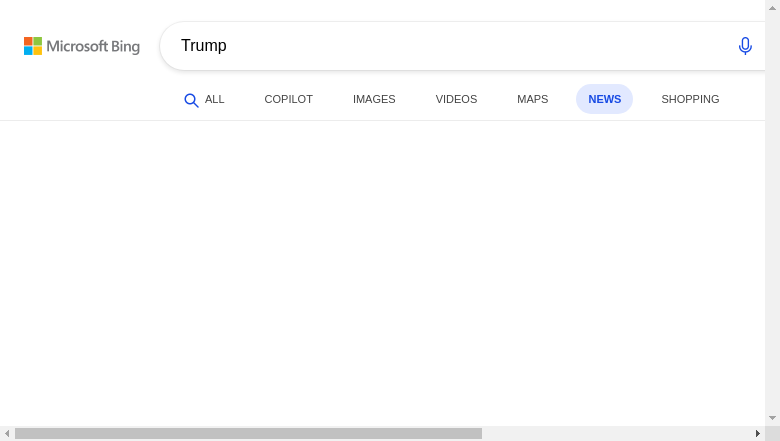
7 Selenium: mimicking the behaviour of an internet user
Until now, we have assumed that we always know the URL we are interested in. Additionally, the pages we visit are “static”, they do not depend on any action or search by the user.
We will now see how to fill in fields on a website and retrieve the information we are interested in.
The reaction of a website to a user’s action often involves the use of JavaScript in the world of web development.
The Selenium package allows
you to automate the behavior of a manual user from within your code.
It enables you to obtain information from a site that is not in the
HTML code but only appears after
the execution of JavaScript scripts in the background.
Selenium behaves like a regular internet user:
it clicks on links, fills out forms, etc.
7.1 First Example: Scraping a Search Engine
In this example, we will try to go to the Bing News site and enter a given topic in the search bar. To test, we will search with the keyword “Trump”.
Installing Selenium requires Chromium, which is a
minimalist version of the Google Chrome browser.
The version of chromedriver
must be >= 2.36 and depends on the version of Chrome you have on your working environment.
To install this minimalist version of Chrome on a
Linux environment, you can refer to the dedicated section.
ImportantInstallation deInstalling Selenium
On Colab, you can use the following commands:
!sudo apt-get update
!sudo apt install -y unzip xvfb libxi6 libgconf-2-4 -y
!sudo apt install chromium-chromedriver -y
!cp /usr/lib/chromium-browser/chromedriver /usr/bin
If you are on the SSP Cloud, you can
run the following commands:
!wget https://dl.google.com/linux/direct/google-chrome-stable_current_amd64.deb -O /tmp/chrome.deb
!sudo apt-get update
!sudo -E apt-get install -y /tmp/chrome.deb
!pip install chromedriver-autoinstaller selenium

import chromedriver_autoinstaller
path_to_web_driver = chromedriver_autoinstaller.install()
You can then install Selenium.
For example, from a
Notebook cell:
First, you need to initialize the behavior
of Selenium by replicating the browser settings. To do this, we will first initialize our browser with a few options:
import time

from selenium import webdriver
from selenium.webdriver.common.keys import Keys

chrome_options = webdriver.ChromeOptions()
chrome_options.add_argument('--headless')
chrome_options.add_argument('--no-sandbox')
chrome_options.add_argument('--disable-dev-shm-usage')
#chrome_options.add_argument('--verbose')
Then we launch the browser:
from selenium.webdriver.chrome.service import Service
service = Service(executable_path=path_to_web_driver)

browser = webdriver.Chrome(
    service=service,
    options=chrome_options
)
We go to the Bing News site,
and we specify the keyword we want to search for.
In this case, we’re interested in news about Donald Trump.
After inspecting the page using the browser’s developer tools,
we see that the search bar is an element in the code called q (as in query).
So we’ll ask selenium to search for this element:
browser.get('https://www.bing.com/news')search = browser.find_element("name", "q")
print(search)
print([search.text, search.tag_name, search.id])
# on envoie à cet endroit le mot qu'on aurait tapé dans la barre de recherche
search.send_keys("Trump")
search_button = browser.find_element("xpath", "//input[@id='sb_form_go']")
search_button.click()Selenium allows you to capture the image you would see in the browser
with get_screenshot_as_png. This can be useful to check if you
have performed the correct action:

Finally, we can extract the results. Several
methods are available. The most
convenient method, when available,
is to use XPath, which is an unambiguous path
to access an element. Indeed,
multiple elements can share the same class or
the same attribute, which can cause such a search
to return multiple matches.
To determine the XPath of an object, the developer tools
of your web browser are handy.
For example, in Firefox, once you
have found an element in the inspector, you
can right-click > Copy > XPath.
Finally, to end our session, we ask Python to close the browser:
browser.quit()We get the following results:
['https://www.msn.com/en-us/news/other/snl-cold-open-slams-trumps-5000-bribe-in-ruthless-mock-campaign-spot/ar-AA2dviV0?ocid=BingNewsVerp', 'https://www.msn.com/en-us/news/other/kaitlan-collins-shows-off-mug-with-trump-dig/ar-AA2duFpt?ocid=BingNewsVerp', 'https://www.newsweek.com/trump-shares-tom-cottons-cell-number-in-daylight-saving-time-fight-12520570', 'https://www.msn.com/en-us/news/other/hes-just-lying-three-time-trump-voters-slam-president-while-revisiting-his-promises/ar-AA2dvg3K?ocid=BingNewsVerp', 'https://www.msn.com/en-us/news/other/natalie-harp-s-role-in-trump-s-propaganda-blitz-exposed/ar-AA2dvSHa?ocid=BingNewsVerp', 'https://apnews.com/article/trump-ohio-jon-husted-vivek-ramaswamy-a86aad6b19d4afb2c505b902171ebd8e', 'https://www.msn.com/en-us/news/other/breaking-down-trump-s-new-drug-factories-claim-about-iranian-nuclear-sites/ar-AA2dtlvm?ocid=BingNewsVerp', 'https://www.newsweek.com/donald-trump-reveals-aerial-view-of-white-house-ballroom-military-complex-12520406', 'https://www.latimes.com/politics/story/2026-10-03/trump-is-campaigning-in-reliably-red-states-sign-of-midterm-concerns', 'https://www.msn.com/en-us/news/other/trump-makes-pitch-to-ohio-voters-as-midterms-approach/ar-AA2duAwk?ocid=BingNewsVerp', 'https://www.foxnews.com/video/6406192765112', 'https://www.politico.com/news/2026/10/03/trump-checks-seniors-medicare-midterms-01105956']Other useful Selenium methods:
| Method | Result |
|---|---|
find_element(****).click() |
Once you have found a reactive element, such as a button, you can click on it to navigate to a new page |
find_element(****).send_keys("toto") |
Once you have found an element, such as a field to enter credentials, you can send a value, in this case “toto”. |
7.2 Additional Exercise
To explore another application of web scraping, you can also tackle topic 5 of the 2023 edition of a non-competitive hackathon organized by Insee:
The NLP section of the course may be useful for the second part of the topic!
Informations additionnelles
NotePython environment
This site was built automatically through a Github action using the Quarto
The environment used to obtain the results is reproducible via uv. The pyproject.toml file used to build this environment is available on the linogaliana/python-datascientist repository
pyproject.toml
[project]
name = "python-datascientist"
version = "0.1.0"
description = "Source code for Lino Galiana's Python for data science course"
readme = "README.md"
requires-python = ">=3.13,<3.14"
dependencies = [
    "altair>=6.0.0",
    "cartiflette",
    "contextily==1.6.2",
    "duckdb>=0.10.1",
    "folium>=0.19.6",
    "gdal==3.11.4",
    "graphviz==0.20.3",
    "great-tables>=0.12.0",
    "gt-extras>=0.0.8",
    "ipykernel>=6.29.5",
    "jupyter>=1.1.1",
    "jupyter-cache>=1.0.0",
    "kaleido>=0.2.1",
    "langchain-community>=0.3.27",
    "loguru==0.7.3",
    "markdown>=3.8",
    "nbclient>=0.10.0",
    "nbformat>=5.10.4",
    "nltk>=3.9.1",
    "pandas>=3.0",
    "pip>=25.1.1",
    "plotly>=6.1.2",
    "plotnine>=0.15",
    "polars>=1.8.2",
    "pyarrow>=17.0.0",
    "pynsee>=0.1.8",
    "python-dotenv>=1.0.1",
    "python-frontmatter>=1.1.0",
    "pywaffle>=1.1.1",
    "requests>=2.32.3",
    "scikit-image>=0.24.0",
    "scikit-learn>=1.8.0",
    "scipy>=1.13.0",
    "seaborn>=0.13.2",
    "selenium<4.39.0",
    "spacy>=3.8.4",
    "webdriver-manager>=4.0.2",
    "wordcloud==1.9.3",
]

[tool.uv.sources]
cartiflette = { git = "https://github.com/inseefrlab/cartiflette" }
gdal = [
  { index = "gdal-wheels", marker = "sys_platform == 'linux'" },
  { index = "geospatial_wheels", marker = "sys_platform == 'win32'" },
]

[[tool.uv.index]]
name = "geospatial_wheels"
url = "https://nathanjmcdougall.github.io/geospatial-wheels-index/"
explicit = true

[[tool.uv.index]]
name = "gdal-wheels"
url = "https://gitlab.com/api/v4/projects/61637378/packages/pypi/simple"
explicit = true

[dependency-groups]
dev = [
    "nb-clean>=4.0.1",
]
To use exactly the same environment (version of Python and packages), please refer to the documentation for uv.
NoteFile history
| SHA | Date | Author | Description |
|---|---|---|---|
| 345804e7 | 2026-09-26 09:17:19 | Lino Galiana | Création d’un PDF avec typst (#703) |
| 0e76c245 | 2026-07-15 18:37:29 | linogaliana | Fix problem with wikipedia scraping |
| efd51b2a | 2026-06-09 18:41:37 | linogaliana | remove Xavier dupré website that no longer exists |
| d957efa7 | 2025-12-07 20:15:10 | lgaliana | Modularise et remet en forme le chapitre webscraping |
| d555fa72 | 2025-09-24 08:39:27 | lgaliana | warninglang partout |
| 378b872a | 2025-09-21 09:31:47 | lgaliana | try/except selenium |
| 53883c08 | 2025-09-20 14:01:30 | lgaliana | try/error pipeline for GHA + update some webscraping codebase to avoid deprecation warning |
| 794ce14a | 2025-09-15 16:21:42 | lgaliana | retouche quelques abstracts |
| 40d6151e | 2025-09-12 12:05:54 | lgaliana | callout warning |
| c3d51646 | 2025-08-12 17:28:51 | Lino Galiana | Ajoute un résumé au début de chaque chapitre (première partie) (#634) |
| 99ab48b0 | 2025-07-25 18:50:15 | Lino Galiana | Utilisation des callout classiques pour les box notes and co (#629) |
| 94648290 | 2025-07-22 18:57:48 | Lino Galiana | Fix boxes now that it is better supported by jupyter (#628) |
| 91431fa2 | 2025-06-09 17:08:00 | Lino Galiana | Improve homepage hero banner (#612) |
| 3f1d2f3f | 2025-03-15 15:55:59 | Lino Galiana | Fix problem with uv and malformed files (#599) |
| 2f96f636 | 2025-01-29 19:49:36 | Lino Galiana | Tweak callout for colab engine (#591) |
| e8beceb7 | 2024-12-11 11:33:21 | Romain Avouac | fix(selenium): chromedriver path (#581) |
| ddc423f1 | 2024-11-12 10:26:14 | lgaliana | Quarto rendering |
| 9d8e69c3 | 2024-10-21 17:10:03 | lgaliana | update badges shortcode for all manipulation part |
| 4be74ea8 | 2024-08-21 17:32:34 | Lino Galiana | Fix a few buggy notebooks (#544) |
| 40446fa3 | 2024-08-21 13:17:17 | Lino Galiana | solve pb (#543) |
| f7d7c83b | 2024-08-21 09:33:26 | linogaliana | solve problem with webscraping chapter |
| 1953609d | 2024-08-12 16:18:19 | linogaliana | One button is enough |
| 64262ca1 | 2024-08-12 17:06:18 | Lino Galiana | Traduction partie webscraping (#541) |
| 101465fb | 2024-08-07 13:56:35 | Lino Galiana | regex, webscraping and API chapters in 🇬🇧 (#532) |
| 065b0abd | 2024-07-08 11:19:43 | Lino Galiana | Nouveaux callout dans la partie manipulation (#513) |
| 06d003a1 | 2024-04-23 10:09:22 | Lino Galiana | Continue la restructuration des sous-parties (#492) |
| 005d89b8 | 2023-12-20 17:23:04 | Lino Galiana | Finalise l’affichage des statistiques Git (#478) |
| 3fba6124 | 2023-12-17 18:16:42 | Lino Galiana | Remove some badges from python (#476) |
| 4cd44f35 | 2023-12-11 17:37:50 | Antoine Palazzolo | Relecture NLP (#474) |
| a06a2689 | 2023-11-23 18:23:28 | Antoine Palazzolo | 2ème relectures chapitres ML (#457) |
| 889a71ba | 2023-11-10 11:40:51 | Antoine Palazzolo | Modification TP 3 (#443) |
| 762f85a8 | 2023-10-23 18:12:15 | Lino Galiana | Mise en forme du TP webscraping (#441) |
| 8071bbb1 | 2023-10-23 17:43:37 | tomseimandi | Make minor changes to 02b, 03, 04a (#440) |
| 3eb0aeb1 | 2023-10-23 11:59:24 | Thomas Faria | Relecture jusqu’aux API (#439) |
| 102ce9fd | 2023-10-22 11:39:37 | Thomas Faria | Relecture Thomas, première partie (#438) |
| fbbf066a | 2023-10-16 14:57:03 | Antoine Palazzolo | Correction TP scraping (#435) |
| a7711832 | 2023-10-09 11:27:45 | Antoine Palazzolo | Relecture TD2 par Antoine (#418) |
| 154f09e4 | 2023-09-26 14:59:11 | Antoine Palazzolo | Des typos corrigées par Antoine (#411) |
| b7f4d7ea | 2023-09-17 17:03:14 | Antoine Palazzolo | Renvoi vers sujet funathon pour partie scraping (#404) |
| 9a4e2267 | 2023-08-28 17:11:52 | Lino Galiana | Action to check URL still exist (#399) |
| 8baf507b | 2023-08-28 11:09:30 | Lino Galiana | Lien mort formation webscraping |
| a8f90c2f | 2023-08-28 09:26:12 | Lino Galiana | Update featured paths (#396) |
| 3bdf3b06 | 2023-08-25 11:23:02 | Lino Galiana | Simplification de la structure 🤓 (#393) |
| 30823c40 | 2023-08-24 14:30:55 | Lino Galiana | Liens morts navbar (#392) |
| 3560f1f8 | 2023-07-21 17:04:56 | Lino Galiana | Build on smaller sized image (#384) |
| 130ed717 | 2023-07-18 19:37:11 | Lino Galiana | Restructure les titres (#374) |
| ef28fefd | 2023-07-07 08:14:42 | Lino Galiana | Listing pour la première partie (#369) |
| f21a24d3 | 2023-07-02 10:58:15 | Lino Galiana | Pipeline Quarto & Pages 🚀 (#365) |
| 38693f62 | 2023-04-19 17:22:36 | Lino Galiana | Rebuild visualisation part (#357) |
| 32486330 | 2023-02-18 13:11:52 | Lino Galiana | Shortcode rawhtml (#354) |
| 3c880d59 | 2022-12-27 17:34:59 | Lino Galiana | Chapitre regex + Change les boites dans plusieurs chapitres (#339) |
| 938f9bcb | 2022-12-04 15:28:37 | Lino Galiana | Test selenium en intégration continue (#331) |
| 342b59b6 | 2022-12-04 11:55:00 | Romain Avouac | Procedure to install selenium on ssp cloud (#330) |
| 037842a9 | 2022-11-22 17:52:25 | Lino Galiana | Webscraping exercice nom et age ministres (#326) |
| 738c0744 | 2022-11-17 12:23:29 | Lino Galiana | Nettoie le TP scraping (#323) |
| f5f0f9c4 | 2022-11-02 19:19:07 | Lino Galiana | Relecture début partie modélisation KA (#318) |
| 43a863f1 | 2022-09-27 11:14:18 | Lino Galiana | Change notebook url (#283) |
| 25046de4 | 2022-09-26 18:08:19 | Lino Galiana | Rectifie bug TP webscraping (#281) |
| 494a85ae | 2022-08-05 14:49:56 | Lino Galiana | Images featured ✨ (#252) |
| d201e3cd | 2022-08-03 15:50:34 | Lino Galiana | Pimp la homepage ✨ (#249) |
| bb38643d | 2022-06-08 16:59:40 | Lino Galiana | Répare bug leaflet (#234) |
| 12965bac | 2022-05-25 15:53:27 | Lino Galiana | :launch: Bascule vers quarto (#226) |
| 9c71d6e7 | 2022-03-08 10:34:26 | Lino Galiana | Plus d’éléments sur S3 (#218) |
| 66e2837c | 2021-12-24 16:54:45 | Lino Galiana | Fix a few typos in the new pipeline tutorial (#208) |
| 0e01c33f | 2021-11-10 12:09:22 | Lino Galiana | Relecture @antuki API+Webscraping + Git (#178) |
| 9a3f7ad8 | 2021-10-31 18:36:25 | Lino Galiana | Nettoyage partie API + Git (#170) |
| 6777f038 | 2021-10-29 09:38:09 | Lino Galiana | Notebooks corrections (#171) |
| 2a8809fb | 2021-10-27 12:05:34 | Lino Galiana | Simplification des hooks pour gagner en flexibilité et clarté (#166) |
| b138cf3e | 2021-10-21 18:05:59 | Lino Galiana | Mise à jour TP webscraping et API (#164) |
| 2e4d5862 | 2021-09-02 12:03:39 | Lino Galiana | Simplify badges generation (#130) |
| 80877d20 | 2021-06-28 11:34:24 | Lino Galiana | Ajout d’un exercice de NLP à partir openfood database (#98) |
| 4cdb759c | 2021-05-12 10:37:23 | Lino Galiana | :sparkles: :star2: Nouveau thème hugo :snake: :fire: (#105) |
| 7f9f97bc | 2021-04-30 21:44:04 | Lino Galiana | 🐳 + 🐍 New workflow (docker 🐳) and new dataset for modelization (2020 🇺🇸 elections) (#99) |
| 6d010fa2 | 2020-09-29 18:45:34 | Lino Galiana | Simplifie l’arborescence du site, partie 1 (#57) |
| 66f9f87a | 2020-09-24 19:23:04 | Lino Galiana | Introduction des figures générées par python dans le site (#52) |
| 5c1e76d9 | 2020-09-09 11:25:38 | Lino Galiana | Ajout des éléments webscraping, regex, API (#21) |
Citation
BibTeX citation:
@book{galiana2025,
  author = {Galiana, Lino},
  title = {Python Pour La Data Science},
  date = {2025},
  url = {https://pythonds.linogaliana.fr/},
  doi = {10.5281/zenodo.8229676},
  langid = {en}
}
For attribution, please cite this work as:
Galiana, Lino. 2025. Python Pour La Data Science. https://doi.org/10.5281/zenodo.8229676.